Your First Open-Source Contribution: A Practical Workflow
Your First Open-Source Contribution: A Practical Workflow
Open source can feel intimidating when you are contributing for the first time.
You might wonder whether your code is good enough, how to understand a large repository, or what to do if a maintainer rejects your pull request.
The truth is that your first contribution does not need to introduce a major feature. Fixing a typo, improving documentation, adding a test, or correcting a small bug can be a valuable starting point.
What matters is learning how real projects collaborate, review changes, and maintain code quality.
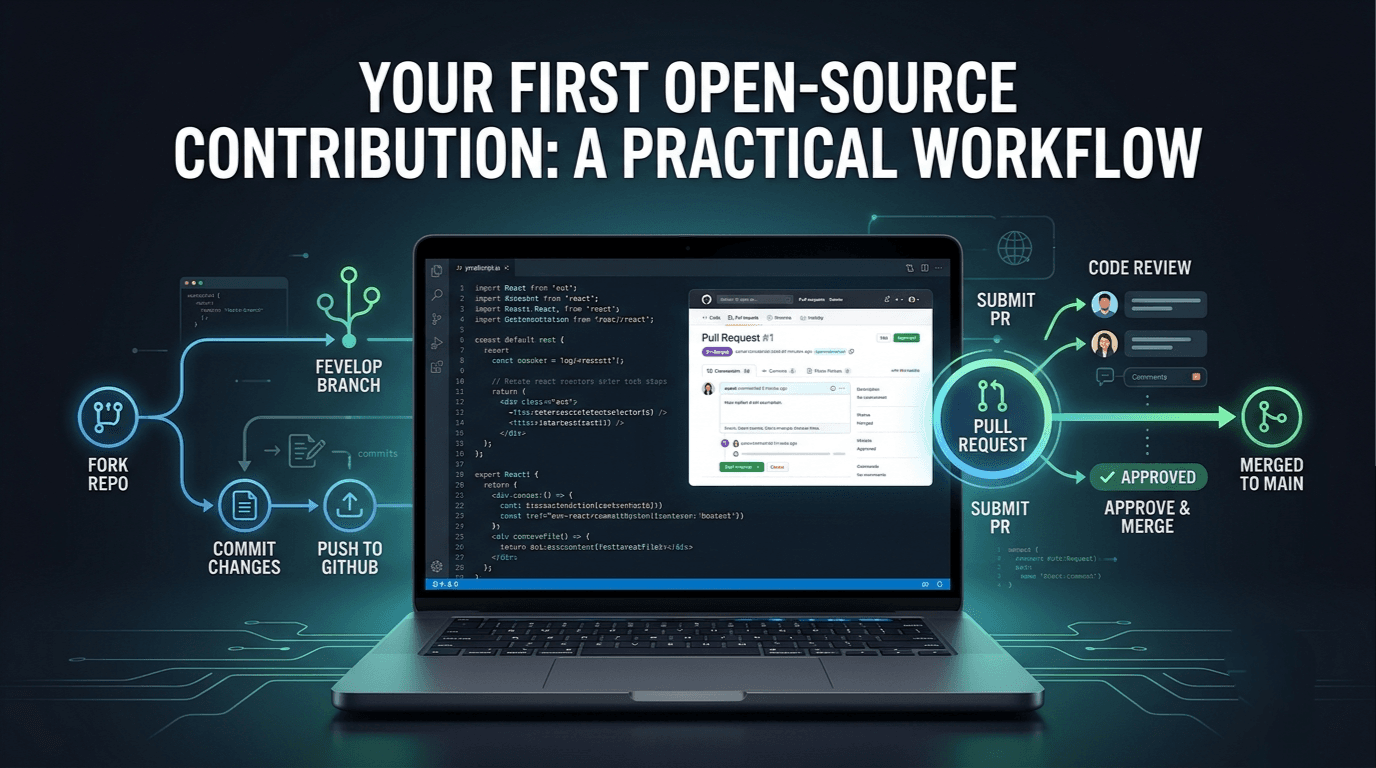
In this guide, we will walk through a practical workflow for making your first open-source contribution using Git and GitHub.
1. Understand What Open Source Means
Open-source software makes its source code available under a license that allows people to use, inspect, and contribute to it according to that license.
Examples include developer tools, frameworks, libraries, operating systems, and documentation projects.
Open-source contributors can help in many ways:
- Fixing bugs
- Improving documentation
- Adding or updating tests
- Reporting reproducible issues
- Improving accessibility
- Fixing incorrect examples
- Implementing new features
- Reviewing code and helping other contributors
You do not need to be an expert to contribute. You need to understand the project, respect its guidelines, and make changes that solve a real problem.
2. Find a Repository That Matches Your Skills
Your first contribution is easier when you choose a project that uses technologies you already understand.
For example, if you work with JavaScript and React, consider contributing to a JavaScript library, a React component library, or a documentation website built with familiar tools.
Useful places to explore include:
- GitHub Explore: https://github.com/explore
- GitHub Topics: https://github.com/topics
- First Contributions: https://github.com/firstcontributions/first-contributions
- Good First Issue: https://goodfirstissue.dev/
Look for repositories that have:
- A clear README
- An active or understandable contribution process
- A license appropriate for the intended use
- Setup instructions that work
- Issues with enough detail to understand the problem
- Tests or other ways to verify your changes
A popular repository is not automatically the best repository for a beginner. A smaller project with clear instructions may provide a better first experience.
What Does "Good First Issue" Mean?
Many repositories use labels such as:
good first issuebeginner-friendlydocumentationhelp wanted
These labels can help you find potential tasks, but they do not guarantee that an issue is easy or still available.
Read the issue description, check recent comments, and inspect the repository before committing to a task.
3. Choose a Small, Clearly Defined Issue
Avoid starting with a large feature that requires understanding the entire codebase.
Instead, look for a task with a specific problem and a clear expected outcome.
For example:
Issue: The README shows an outdated command for starting the development server.
Expected result: Update the command and verify that it matches the current project configuration.
Another example:
Issue: A utility function does not handle an empty input correctly.
Expected result: Add the missing behavior and a regression test.
Before starting work, ask yourself:
- Can I reproduce or understand the problem?
- Do I understand what the expected behavior should be?
- Can I identify the relevant files?
- Can I verify the change locally?
- Does the repository allow me to work on this issue?
If the issue is unclear, ask a focused question in the issue discussion or follow the project's contribution instructions.
Do not assume that every open issue is available to claim. Some projects require maintainers to assign work or approve a proposed solution first.
4. Read the Project's Contribution Guidelines
Before changing code, inspect the repository's documentation.
Important files may include:
README.md— project overview and setup instructionsCONTRIBUTING.md— contribution rules and workflowCODE_OF_CONDUCT.md— expected community behaviorLICENSE— legal terms for using and distributing the softwarepackage.json— scripts and dependencies in a Node.js project
Also check for issue templates, pull request templates, coding standards, and test instructions.
Different projects use different workflows. Some require formatting checks, signed commits, a specific Node.js version, or a particular commit-message convention.
Following these instructions shows that you respect the maintainers' time and the project's established practices.
5. Set Up the Project Locally
Once you understand the task, create a local development environment.
For a GitHub repository, begin by forking it if the project's workflow calls for a fork.
A fork is your own GitHub copy of the repository. It lets you propose changes without needing direct write access to the original project.
Step 1: Fork the Repository
Open the repository on GitHub and select Fork.
GitHub creates a copy under your account.
Step 2: Clone Your Fork
Copy the URL of your fork and run:
git clone https://github.com/YOUR-USERNAME/REPOSITORY.git
cd REPOSITORY
Replace the placeholders with your GitHub username and the actual repository name.
Step 3: Install Dependencies
For a Node.js project using npm:
npm ciUse the package manager and setup instructions specified by the repository. For example, some projects use pnpm, Yarn, Python tooling, or another build system.
Step 4: Run the Existing Tests
npm testThe command depends on the project's configured scripts.
Running the existing tests helps you understand whether the project works before you make changes. If a test fails initially, investigate whether it is an existing problem or an environment issue.
Do not immediately assume that you caused a failure that was already present.
6. Create a Dedicated Git Branch
Do not make your contribution directly on the main branch of your local repository.
Create a branch for your task:
git switch -c fix/empty-input-validationA dedicated branch keeps your changes separate and makes the contribution easier to review.
Common branch naming patterns include:
feature/add-search-filter
fix/empty-input-validation
docs/update-installation-guide
test/add-api-validation-tests
Choose a descriptive name that reflects the actual change.
If the project specifies its own naming convention, follow that instead.
7. Understand the Code Before Editing It
One of the biggest mistakes beginners make is changing code before understanding the surrounding implementation.
Start by locating the relevant files.
Useful commands include:
git status
git log --oneline -5
You can also search for a function, endpoint, component, or error message using your editor or the command-line tools available in your environment.
Read the existing implementation and look for:
- How similar functionality is implemented
- Which conventions the project follows
- Whether tests already cover the relevant behavior
- Whether the issue affects other parts of the application
- Whether documentation needs to change alongside the code
Do not rewrite an entire module when a small, targeted fix solves the problem.
A focused patch is generally easier to understand, test, and review.
8. Make One Focused Change
Imagine a JavaScript utility should return false when given an empty string, but it currently checks only whether the value is defined.
A simplified implementation might look like this:
function hasValue(value) {
  return value !== undefined && value !== null;
}
A possible correction, if the intended behavior is to reject empty or whitespace-only strings, is:
function hasValue(value) {
  return (
    value !== undefined &&
    value !== null &&
    String(value).trim() !== ""
  );
}
However, the correct implementation depends on the function's contract. Some utilities must preserve valid values such as 0 and false, while others should accept only strings.
The lesson is not to apply this exact implementation everywhere. It is to understand the expected behavior, make the smallest appropriate change, and verify it.
Avoid including unrelated formatting changes, refactoring, or new features in the same pull request unless they are necessary for the issue.
9. Add or Update Tests
A bug fix should ideally include a test that fails when the bug is present and passes after the fix.
For the illustrative utility above, test cases might include:
expect(hasValue("hello")).toBe(true);
expect(hasValue("")).toBe(false);
expect(hasValue("   ")).toBe(false);
expect(hasValue(null)).toBe(false);
expect(hasValue(undefined)).toBe(false);
These examples assume the intended contract is to reject empty and whitespace-only values.
Also consider whether values such as 0 and false should be accepted. Their behavior should be explicitly defined and tested.
After making your changes, run the relevant tests:
npm testThen run any other checks required by the project, such as linting, formatting, type checking, or a build.
Important: Do not delete a failing test or weaken an assertion simply to make the test suite pass. Understand the failure and fix the actual problem.
10. Review Your Changes Before Committing
Before creating a commit, inspect what you changed.
git status
git diff
To inspect a summary of the changes:
git diff --statAsk yourself:
- Did I modify only the intended files?
- Did I accidentally include secrets or local configuration?
- Are the names and formatting consistent with the project?
- Do the tests pass?
- Did I update relevant documentation?
- Can I explain every important line in the diff?
If you discover unrelated changes, remove them from the contribution unless they are genuinely necessary.
A good pull request should make the intended change obvious.
11. Commit and Push Your Changes
Once the changes are ready, stage the relevant files:
git add path/to/changed-file.jsIf multiple intended files are part of the fix, stage those as well.
Create a descriptive commit:
git commit -m "fix: handle empty input validation"Use the project's commit-message convention if one exists.
Push your branch to your fork:
git push -u origin fix/empty-input-validationYour branch is now available on GitHub for review.
Avoid committing .env files, private keys, access tokens, personal data, or other sensitive information.
12. Open a Pull Request
A pull request (PR) proposes your changes to the original repository.
Open your fork on GitHub and select the option to create a pull request. Confirm that the base repository and target branch are correct.
A useful pull request description should explain three things:
- What problem does this change solve?
- What did you change?
- How did you test it?
For example:
## Summary

Fixes empty-input validation in the utility function.

## Changes

- Rejects empty and whitespace-only strings.
- Adds tests for missing and empty values.

## Testing

- Ran the relevant unit tests.
- Verified the expected behavior for valid and invalid inputs.
Use the actual results from your work. Never claim that tests passed if you did not run them.
If the change addresses an existing issue, reference it according to the repository's contribution guidelines.
A concise, well-structured PR helps maintainers understand your work without having to guess your intentions.
13. Respond to Code Review
Opening a pull request is not always the final step.
Maintainers may request changes, ask questions, or suggest a different implementation. This is a normal part of collaborative software development.
When receiving feedback:
- Read the comments carefully.
- Ask for clarification if you do not understand a suggestion.
- Evaluate the reasoning behind the requested change.
- Make the appropriate updates.
- Run the relevant tests again.
- Push the new commit or commits to the same branch.
For example, a maintainer might ask you to use an existing helper instead of duplicating validation logic.
This is an opportunity to understand the project's architecture and conventions.
Do not take technical feedback personally. The purpose of code review is to improve the change and maintain the quality of the project.
Also, respect the maintainers' time. Follow up politely, avoid repeatedly posting the same message, and understand that maintainers may have limited availability.
14. What If Your Pull Request Is Rejected?
Not every contribution gets merged.
A pull request may be declined because:
- The issue has already been fixed.
- The proposed behavior does not match the project's direction.
- The implementation duplicates existing functionality.
- The change is too broad.
- The maintainers prefer a different approach.
- The issue is no longer relevant.
A rejected PR does not mean you are incapable of contributing.
Read the explanation, learn from the feedback, and decide whether to revise the work or move on.
If the task is no longer needed, thank the maintainers for reviewing it and use the experience to improve your next contribution.
The goal of your first contribution is not merely to get a green check mark on GitHub. It is to learn how real software projects are maintained and improved.
15. Common Mistakes First-Time Contributors Should Avoid
Choosing an issue that is too large
Start with a task you can understand and verify. Large features introduce too many unknowns for a first contribution.
Ignoring the contribution guidelines
A technically correct patch can still require substantial rework if it ignores repository conventions.
Changing too many things at once
Keep the patch focused. Small pull requests are generally easier to review.
Skipping tests
Without verification, it is difficult to know whether the change actually solves the problem or breaks existing behavior.
Writing vague commit messages
Messages such as update, changes, or fix stuff do not communicate the purpose of a commit.
Opening a pull request without context
Explain the problem, the solution, and the tests. Make it easy for maintainers to review your work.
Disappearing after review feedback
Respond to review comments when you can. If you need clarification or more time, communicate that politely.
Treating contribution counts as the goal
A meaningful fix, a well-written explanation, and a deeper understanding of a project can be more valuable than submitting many low-quality changes.
16. Your First Contribution Checklist
Use this checklist when working on your first open-source task.
- Found a repository that matches my skills.
- Read the README and contribution guidelines.
- Understood the issue and expected behavior.
- Forked and cloned the repository, if required.
- Installed dependencies and checked the existing tests.
- Created a dedicated branch.
- Made a focused change.
- Added or updated relevant tests.
- Ran the required checks.
- Reviewed the diff for unrelated changes and secrets.
- Created a descriptive commit.
- Pushed the branch.
- Opened a clear pull request.
- Responded constructively to review feedback.
You do not have to rush through this process. Understanding each step is more important than completing it quickly.
Conclusion
Your first open-source contribution does not need to be impressive in size. It needs to be thoughtful, focused, and verifiable.
Choose a project you understand, start with a manageable issue, follow the repository's guidelines, and make a change you can explain confidently.
You will learn more than Git commands along the way. You will practice reading unfamiliar code, communicating with other developers, testing assumptions, and responding to feedback—skills that are valuable in internships and professional software development.
Start small, learn from every review, and keep contributing.
You do not have to be an expert to contribute to open source. You have to be willing to learn, collaborate, and improve.
Related Articles