Authentication and Authorization for Mobile Apps
Authentication and Authorization for Mobile Apps
A login screen is easy to build. Building a secure authentication system is much harder.
A mobile app may need to keep users signed in, protect private screens, refresh expired tokens, handle logout, and prevent one user from accessing another user's data.
These responsibilities involve more than the frontend. A secure implementation requires coordination between the mobile application, the authentication server, and the database.
In this guide, we'll build a practical understanding of authentication and authorization for React Native applications using TypeScript, access tokens, refresh tokens, secure storage, and backend API protection.
1. Authentication vs. Authorization
These two terms sound similar, but they solve different problems.
Authentication answers: Who are you?
It verifies a user's identity through credentials, a passkey, an identity provider, or another supported method.
Authorization answers: What are you allowed to do?
It determines whether an authenticated user can access a particular resource or perform an action.
Consider a college ERP application.
- A student signs in using their credentials. This is authentication.
- The student opens their attendance screen. The server checks whether they can access that data. This is authorization.
- An administrator opens the attendance management screen. The server checks whether the administrator has the required permissions.
A user being logged in does not automatically grant permission to access every API endpoint.
A simple mental model
User
 |
 v
Authentication
"Who are you?"
 |
 v
Authenticated identity
 |
 v
Authorization
"What can you access?"
 |
 v
Protected resource
Both checks matter. A secure app needs to verify identity and enforce permissions.
2. How Mobile Authentication Works
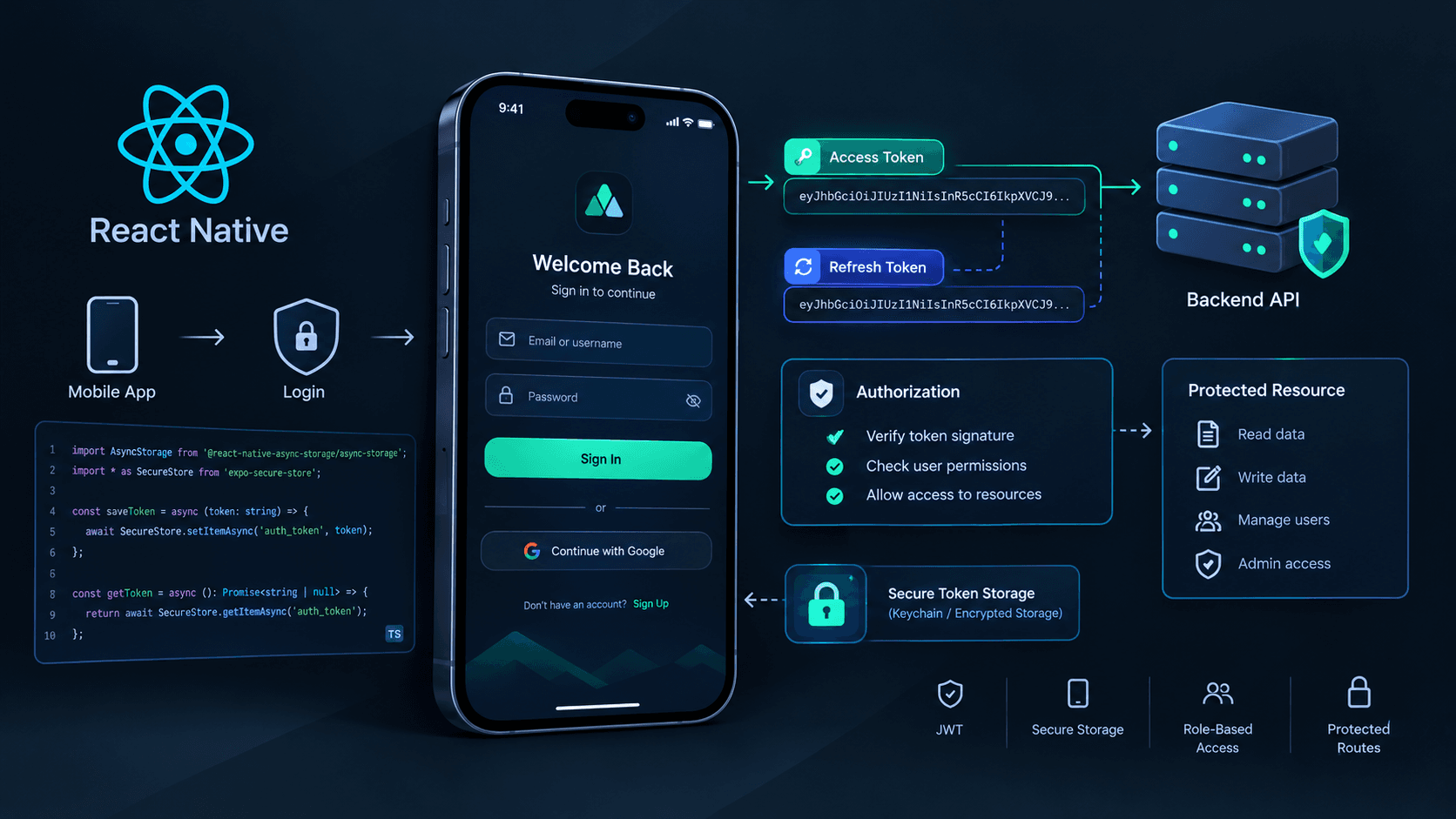
A typical token-based authentication flow looks like this:
React Native App
       |
       | Email + Password
       v
Authentication API
       |
       | Verify credentials
       v
Access Token + Refresh Token
       |
       v
Secure Token Storage
       |
       | Access Token
       v
Protected API Request
       |
       v
Server Validates Token
       |
       v
Authorized Response
The server verifies the user's credentials and issues tokens according to its authentication policy.
The app stores the necessary credentials securely and sends the access token when requesting protected resources.
The server validates the token and checks the user's permissions before returning sensitive data.
Important: A token stored in the mobile app is not proof that every requested action is allowed. The server must enforce authentication and authorization independently.
3. Access Tokens and Refresh Tokens
Many authentication systems use two different tokens.
Access token
An access token is sent with requests to protected APIs.
For example:
GET /api/profile
Authorization: Bearer ACCESS_TOKEN
Access tokens should generally have a relatively short lifetime to limit the damage if one is compromised.
The appropriate lifetime depends on the application's security requirements and authentication architecture.
Refresh token
A refresh token allows the client to obtain a new access token without asking the user to enter their password again.
A typical flow is:
- The app sends an API request with its access token.
- The server rejects the expired token, commonly with HTTP 401.
- The app sends its refresh token to the refresh endpoint.
- The server validates the refresh token.
- The server issues a new access token and, when using rotation, a new refresh token.
- The app securely stores the new credentials and retries the original request once.
Refresh tokens are especially sensitive because they can extend a user's session.
A robust implementation should support revocation, expiration, and refresh-token rotation where appropriate. The server should detect reuse of invalidated rotated refresh tokens when its design supports that protection.
JWT is not the same as encryption
JSON Web Tokens (JWTs) are often used as access tokens, but JWT is a token format rather than a complete authentication system.
A signed JWT can protect the integrity of its claims without hiding them. Its payload is generally readable by anyone who obtains the token.
Never put passwords, private keys, or other secrets inside a normal signed JWT.
The server must validate the signature, permitted algorithm, expiration, issuer, audience, and other required claims. Authorization decisions must also be enforced server-side.
References:
4. Store Tokens Securely in React Native
One of the most important mobile security decisions is where authentication tokens are stored.
React Native offers different storage options, but they do not provide the same security guarantees.
| Storage option | Appropriate use |
|---|---|
| AsyncStorage | Non-sensitive preferences and ordinary cached data |
| Expo SecureStore | Small secrets and tokens using platform-backed secure storage |
| Native Keychain / Keystore-backed solutions | Sensitive credentials requiring platform security controls |
| In-memory state | Tokens needed only while the application process remains active |
Do not treat AsyncStorage as secure token storage. It is persistent app storage, not an encrypted credential vault.
For an Expo application, expo-secure-store is a practical option for storing sensitive tokens.
Install it with:
npx expo install expo-secure-storeCreate a small storage module:
// src/auth/tokenStorage.ts

import * as SecureStore from 'expo-secure-store';

const ACCESS_TOKEN_KEY = 'access_token';
const REFRESH_TOKEN_KEY = 'refresh_token';

export async function saveTokens(
  accessToken: string,
  refreshToken: string
) {
  await Promise.all([
    SecureStore.setItemAsync(
      ACCESS_TOKEN_KEY,
      accessToken
    ),
    SecureStore.setItemAsync(
      REFRESH_TOKEN_KEY,
      refreshToken
    ),
  ]);
}

export async function getAccessToken() {
  return SecureStore.getItemAsync(ACCESS_TOKEN_KEY);
}

export async function getRefreshToken() {
  return SecureStore.getItemAsync(REFRESH_TOKEN_KEY);
}

export async function clearTokens() {
  await Promise.all([
    SecureStore.deleteItemAsync(ACCESS_TOKEN_KEY),
    SecureStore.deleteItemAsync(REFRESH_TOKEN_KEY),
  ]);
}
This module keeps storage logic in one place instead of spreading token handling throughout the application.
Important storage considerations
- Handle storage failures instead of assuming every operation succeeds.
- Keep tokens out of logs, analytics events, and crash reports.
- Do not store passwords after login.
- Avoid storing authentication tokens in URLs.
- Use HTTPS for API communication.
- Check the platform-specific behavior of your secure-storage library.
- Test reinstall, backup, and device-migration behavior according to your security requirements.
Expo SecureStore is designed for small values, not large application datasets. Its persistence behavior also differs between platforms. Review its current documentation before depending on tokens surviving reinstall or device migration.
For a bare React Native application, choose a maintained native Keychain/Keystore-backed library compatible with your React Native version.
Documentation: Expo SecureStore
5. Build an Authentication API
The mobile app should not independently decide whether a password is valid or whether a user has administrator privileges.
Those decisions belong on the server.
A simple API design might include:
POST /auth/login
POST /auth/refresh
POST /auth/logout
GET  /auth/me

GET  /api/profile
GET  /api/attendance
GET  /api/admin/users
Possible responsibilities:
/auth/loginverifies credentials and creates a session./auth/refreshvalidates a refresh token and issues new credentials./auth/logoutrevokes the session or refresh token./auth/mereturns the authenticated user's profile.- Protected endpoints validate the access token and enforce permissions.
The server should hash passwords with a modern password-hashing algorithm such as Argon2id, using a maintained library and suitable parameters.
It should also implement rate limiting, input validation, safe error responses, and appropriate session expiration policies.
Never trust a role, user ID, or permission supplied by the client without verifying it against trusted server-side information.
6. Send the Access Token with API Requests
Suppose your React Native application uses Axios.
Create a shared API client:
// src/api/client.ts

import axios from 'axios';
import { getAccessToken } from '../auth/tokenStorage';

export const api = axios.create({
  baseURL: process.env.EXPO_PUBLIC_API_URL,
  timeout: 15000,
});

api.interceptors.request.use(async (config) => {
  const accessToken = await getAccessToken();

  if (accessToken) {
    config.headers.Authorization = `Bearer ${accessToken}`;
  }

  return config;
});
Now application features can use the shared client:
import { api } from '../api/client';

export async function getMyProfile() {
  const response = await api.get('/api/profile');

  return response.data;
}
This centralizes the logic for attaching access tokens to requests.
Protect your API configuration
Expo public environment variables prefixed with EXPO_PUBLIC_ are bundled into the client application. They are suitable for values such as a public API base URL, but never for private API keys, passwords, signing secrets, or database credentials.
A mobile application cannot reliably keep a secret embedded in its distributed JavaScript bundle.
7. Handle Expired Access Tokens
An access token can expire while the user is actively using the application.
The app needs a defined response to expiration rather than leaving the user stuck on a broken screen.
A typical refresh strategy:
API Request
    |
    v
Response is 401?
    |
    +-- No --> Return response
    |
    +-- Yes --> Attempt refresh once
                    |
                    v
             Refresh succeeds?
                /       \
              Yes        No
               |          |
        Save new tokens   Clear session
               |          |
        Retry request    Sign in again
        once only
Do not blindly retry every failed request. A 403 usually indicates that the user lacks permission, not that their access token needs refreshing.
Also, a 401 can have causes other than expiration, depending on your API design. Use a documented error response or error code to identify when refreshing is appropriate.
Avoid refresh-request loops
A production implementation should:
- Exclude the refresh endpoint from the ordinary refresh interceptor.
- Retry an original request no more than once.
- Prevent many simultaneous requests from starting separate refresh operations.
- Handle refresh-token expiration or revocation.
- Clear the local session when recovery fails.
- Avoid replaying non-idempotent operations without considering whether the server already processed them.
For concurrent requests, a shared refresh promise or a properly implemented request queue can prevent a refresh storm.
Token refresh logic is security-sensitive. Test expiration, network failure, multiple concurrent requests, logout during refresh, and invalid refresh tokens before shipping it.
8. Protect Screens Without Treating Navigation as Security
A React Native app can conditionally render its authenticated navigation tree.
For example, the root navigator might use three states:
Bootstrapping
      |
      v
Checking saved session
      |
      +-- No valid session --> Signed-out screens
      |
      +-- Session available --> Authenticated screens
A simplified React example:
import { NavigationContainer } from '@react-navigation/native';
import { createNativeStackNavigator } from '@react-navigation/native-stack';

const Stack = createNativeStackNavigator();

type RootNavigatorProps = {
  isLoading: boolean;
  isAuthenticated: boolean;
};

export function RootNavigator({
  isLoading,
  isAuthenticated,
}: RootNavigatorProps) {
  if (isLoading) {
    return <SplashScreen />;
  }

  return (
    <NavigationContainer>
      <Stack.Navigator>
        {!isAuthenticated ? (
          <Stack.Screen
            name="Login"
            component={LoginScreen}
          />
        ) : (
          <>
            <Stack.Screen
              name="Home"
              component={HomeScreen}
            />
            <Stack.Screen
              name="Profile"
              component={ProfileScreen}
            />
          </>
        )}
      </Stack.Navigator>
    </NavigationContainer>
  );
}
This illustrates conditional navigation. In a real project, define your route parameter types, import the actual screen components, and integrate the navigator with your authentication state.
The application should restore its session before rendering the final navigation tree. Otherwise, users may briefly see the login screen or authenticated content in the wrong state.
Important: Hiding a screen is a user-experience measure, not an authorization boundary. Someone can bypass client-side navigation and call your API directly. Every protected server endpoint must validate the request independently.
9. Authentication State Should Be Centralized
As an application grows, multiple screens may need to know whether a user is signed in.
Instead of checking secure storage independently in every component, use a centralized authentication provider or state-management layer.
A basic state model could be:
type AuthState =
  | { status: 'loading' }
  | { status: 'signedOut' }
  | {
      status: 'signedIn';
      user: {
        id: string;
        email: string;
      };
    };
This makes the possible states explicit.
Your authentication layer should own responsibilities such as:
- Restoring the session during startup.
- Performing login and logout.
- Coordinating token refresh.
- Loading the authenticated user's profile.
- Clearing user-specific state after logout.
- Handling expired or revoked sessions.
The access token does not necessarily need to live in a global state store. Keeping sensitive credentials in secure storage and exposing only the necessary authentication state to UI components can simplify the security model.
For example, Redux Toolkit, Zustand, or React Context can hold the current user and authentication status. Choose the approach that fits the rest of your application rather than introducing another library solely for authentication.
10. Authorization: Roles and Permissions
Imagine a college ERP application with students, faculty members, and administrators.
You might define roles such as:
type Role = 'student' | 'faculty' | 'admin';The interface can use the user's role to decide which actions to display:
{user.role === 'admin' && (
  <Button title="Manage Users" onPress={openUserManagement} />
)}
However, the server must enforce the same permission independently.
A malicious client can modify local JavaScript, change state, or call the endpoint without using your interface.
A backend authorization check should verify:
- The access token is valid.
- The identity is associated with the requested resource.
- The user has the required role or permission.
- Any resource-specific access rules are satisfied.
For example, a student should only be able to access attendance records they are authorized to view. Checking that the student is logged in is not enough.
Use the principle of least privilege: grant only the permissions required for each user and operation.
For applications with complex permissions, explicit permissions such as attendance:read, attendance:write, and users:manage are often more flexible than relying exclusively on broad role names.
11. Logout Must Clear the Session Properly
Logout is more than navigating back to the login screen.
A complete logout flow should:
- Ask the server to revoke the refresh token or session when supported.
- Clear locally stored authentication credentials.
- Reset authentication state.
- Clear user-specific cached data and sensitive application state.
- Return the user to the signed-out navigation tree.
For example:
import { clearTokens } from './tokenStorage';

export async function clearLocalSession() {
  await clearTokens();

  // Also reset your authentication store,
  // user-specific caches, and private screen state.
}
This is only the local cleanup portion. A production logout operation should coordinate with the server according to the session design.
If the device is offline, local credentials should still be cleared promptly. The application can report that remote revocation could not be confirmed and rely on server-side expiration and revocation policies.
12. Common Authentication Mistakes
Avoid these mistakes when building mobile applications:
Storing tokens in AsyncStorage without a threat assessment
AsyncStorage is not designed as a secure credential vault. Use platform-backed secure storage for sensitive tokens.
Putting secrets in the mobile application
Anything embedded in a distributed app can potentially be extracted. Keep signing keys, database credentials, and private API secrets on trusted servers.
Trusting client-side role checks
Hiding an admin button does not stop someone from calling the admin API directly. Enforce permissions on the backend.
Using access tokens that never expire
Long-lived bearer tokens increase the window of exposure if stolen. Choose expiration and refresh policies appropriate to your risk.
Ignoring refresh-token revocation
A refresh token should have a defined lifecycle, including expiration, revocation, and rotation where appropriate.
Logging credentials
Never log passwords, access tokens, refresh tokens, or authorization headers.
Using HTTP for authenticated API traffic
Use HTTPS and configure production networking appropriately. Never disable certificate validation to work around certificate errors.
Assuming JWT claims are secret
A signed JWT payload is not automatically encrypted. Do not place sensitive information in it unnecessarily.
Forgetting to clear user-specific data
Logging out should also clear private cached data and reset state so the next user cannot see the previous user's information.
13. Production Security Checklist
Before releasing your mobile application, review these items:
- Use a trusted authentication implementation or identity provider.
- Use HTTPS for all authenticated API traffic.
- Store sensitive tokens in platform-backed secure storage.
- Keep private server credentials out of the mobile bundle.
- Validate tokens and enforce permissions on the server.
- Use suitable access-token expiration and refresh-token policies.
- Handle token refresh concurrency and failure.
- Revoke sessions or refresh tokens during logout where supported.
- Rate-limit authentication endpoints and protect against credential attacks.
- Avoid logging credentials and sensitive user data.
- Clear user-specific caches and application state on logout.
- Test expired sessions, revoked tokens, network failures, and unauthorized requests.
For OAuth 2.0 or OpenID Connect sign-in, use the authorization flow recommended for native applications, generally Authorization Code with PKCE. Prefer the system browser or an appropriate platform authentication session rather than collecting a third-party provider's password directly inside your own app.
Useful references:
- RFC 8252 — OAuth 2.0 for Native Apps
- RFC 9700 — OAuth 2.0 Security Best Current Practice
- OWASP MASVS — Mobile Application Security Verification Standard
- Expo SecureStore Documentation
Conclusion
Secure mobile authentication requires more than a login form and a token.
The mobile app manages the user experience and stores credentials appropriately. The authentication server verifies identity and manages sessions. The backend enforces permissions on every protected resource.
Keep those responsibilities separate, use secure storage for sensitive credentials, handle token expiration deliberately, and never rely on client-side checks as your only security boundary.
When these pieces work together, your React Native application has a much stronger foundation for protecting user accounts and private data.