Background Jobs in React Native Apps: Queues, Retries, and Offline Tasks
Background Jobs in React Native Apps: Queues, Retries, and Offline Tasks
A mobile app should not lose a user's work just because the internet disconnects, a request times out, or the app moves to the background.
Imagine a user uploading photos, submitting an order, or writing a message on an unstable network. If the request fails, the app should provide a reliable way to retry it instead of forcing the user to start over.
This is where background tasks, offline queues, retries, and job processing become important.
However, there is one critical distinction:
A task queue inside a mobile app is not the same as a background execution system or a server-side job queue.
Understanding the difference helps you design reliable React Native applications without relying on background execution that the operating system may not allow.
1. What Are Background Jobs in a Mobile App?
A background job is work that can be processed outside the immediate user interaction.
Examples include:
- Uploading files after a user selects them.
- Synchronizing locally saved data with a server.
- Retrying a failed API request.
- Processing a notification-related action.
- Sending analytics events.
- Generating reports or processing images on a backend.
These jobs do not all need the same execution strategy.
| Task | Suitable approach |
|---|---|
| Retry a failed API request | Bounded retry logic |
| Save an action while offline | Persistent local queue |
| Synchronize data when connectivity returns | Offline synchronization |
| Perform scheduled maintenance | Platform background task |
| Send emails or generate reports | Server-side job queue |
| Upload a large file reliably | Resumable upload or platform-supported background transfer |
The correct approach depends on whether the task must survive an app restart, whether it needs the network, and how soon it must finish.
2. Understand the Three Different Queues
The term "background queue" is often used for several different systems.
A. In-memory queue
An in-memory queue stores pending tasks in application memory.
It is useful for coordinating work while the app is running, but the queue disappears if the process is terminated.
Use it for: temporary tasks that can safely be recreated.
B. Persistent offline queue
A persistent queue stores pending actions in local storage or a local database.
For example, a user creates a message while offline. The app saves the message locally and synchronizes it when connectivity returns.
Use it for: user actions that must survive navigation, app restarts, and temporary network failures.
Persistence alone does not guarantee execution in the background. The app still needs an opportunity to run the synchronization code.
C. Server-side job queue
A server-side queue stores jobs for backend workers to process. In a Node.js application, BullMQ with Redis is one common option.
For example, after an order is created, the backend can enqueue invoice generation, email delivery, or report processing.
Use it for: long-running, retryable, or resource-intensive work that should not depend on the mobile app remaining open.
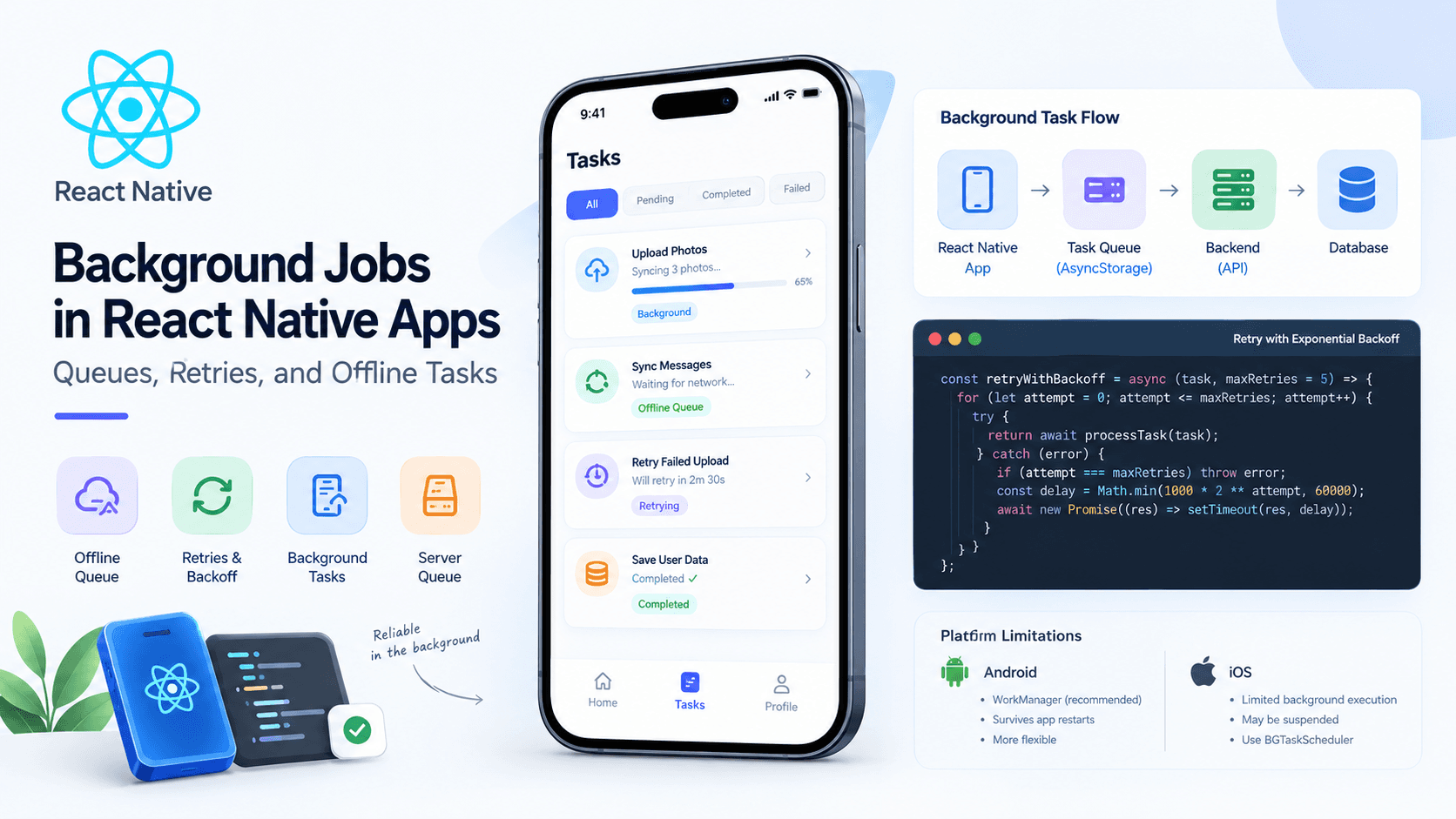
3. Architecture: From Mobile Action to Completed Job
A practical architecture separates mobile persistence from backend processing.
Scroll to zoom · Drag to pan
The mobile app is responsible for preserving user intent and communicating with the backend. The backend is responsible for durable business processing.
For example, the mobile app may show "Order submitted" after the API confirms that the order was saved. It should not wait for an email worker to finish before confirming the order.
If an email fails later, the backend can retry it without requiring the user to reopen the app.
4. Implement Bounded Retries with Exponential Backoff
A temporary failure does not always mean an operation should be abandoned.
A request might fail because of:
- A temporary network interruption.
- A server returning
503 Service Unavailable. - A request timeout.
- A temporary rate limit.
Retrying immediately in a loop is a bad idea. It can overload the server and make an outage worse.
Exponential backoff increases the delay between retry attempts.
For example, a retry schedule might use approximately:
| Retry | Delay |
|---|---|
| 1 | 1 second |
| 2 | 2 seconds |
| 3 | 4 seconds |
| 4 | 8 seconds |
In practice, add jitter (a random variation in delay) so many clients do not retry at exactly the same time.
TypeScript retry utility
type RetryOptions = {
  maxRetries?: number;
  baseDelayMs?: number;
  maxDelayMs?: number;
};

const sleep = (ms: number) =>
  new Promise<void>((resolve) => setTimeout(resolve, ms));

export async function retry<T>(
  operation: () => Promise<T>,
  {
    maxRetries = 3,
    baseDelayMs = 1_000,
    maxDelayMs = 30_000,
  }: RetryOptions = {},
): Promise<T> {
  for (let attempt = 0; ; attempt++) {
    try {
      return await operation();
    } catch (error) {
      if (attempt >= maxRetries) {
        throw error;
      }

      const exponentialDelay = Math.min(
        baseDelayMs * 2 ** attempt,
        maxDelayMs,
      );

      // Full jitter: random delay from zero to the calculated maximum.
      const delay = Math.random() * exponentialDelay;

      await sleep(delay);
    }
  }
}
Usage:
const profile = await retry(
  () => api.get("/profile").then((response) => response.data),
  {
    maxRetries: 3,
    baseDelayMs: 1_000,
    maxDelayMs: 10_000,
  },
);
Here, maxRetries: 3 means one initial attempt plus up to three retries.
This is a basic utility, not a complete offline queue. It retries while the JavaScript execution context remains alive; it does not persist work or guarantee that the app will run in the background.
When should you retry?
Not every failure is temporary.
| Failure | Typical handling |
|---|---|
| Network timeout | Retry with a limit |
| HTTP 429 | Respect Retry-After when supplied |
| HTTP 500 or 503 | Retry selectively |
| HTTP 400 validation error | Show the validation error |
| HTTP 401 | Follow the authentication refresh flow if supported |
| HTTP 403 | Do not blindly retry |
| Payment request with unknown outcome | Reconcile using an idempotency key or server status |
For production systems, classify errors instead of retrying every exception.
Important: retries can duplicate operations. For actions such as creating an order or charging a payment, use backend-supported idempotency keys and reconciliation. A timeout does not prove the server failed to process the original request.
5. Build an Offline Queue That Preserves User Actions
Suppose a user writes a message without an internet connection.
Instead of discarding the message, save a durable record describing the action.
A simple queue item could look like this:
type PendingAction = {
  id: string;
  type: "CREATE_MESSAGE";
  payload: {
    conversationId: string;
    text: string;
  };
  createdAt: number;
  attempts: number;
  status: "pending" | "processing" | "failed";
};
Each item needs a stable ID so it can be tracked across app restarts and server responses.
A real implementation should persist these records using a suitable local database or storage layer. For a small queue, AsyncStorage may be sufficient; for complex transactional queues, consider SQLite or another database that supports the consistency guarantees you need.
Avoid storing authentication secrets or sensitive personal data in an unprotected queue.
Suggested queue lifecycle
Scroll to zoom · Drag to pan
A queue item should not be deleted merely because a request was started. Mark it complete only after the server confirms the operation, or after the client can otherwise establish a successful outcome.
Synchronization rules
A reliable offline queue should:
- Persist actions before reporting that they are safely queued.
- Process actions in a deliberate order when order matters.
- Use stable operation IDs and backend idempotency where appropriate.
- Distinguish retryable failures from permanent errors.
- Limit concurrent work and retry counts.
- Record enough information to resume after an app restart.
- Provide a way to inspect and recover failed actions.
- Avoid processing the same item concurrently in multiple workers.
If the app is terminated while an item is processing, the next run should be able to recover it. For example, a stale processing item can be returned to pending after checking its lease or processing timestamp.
Do not assume a local queue guarantees exactly-once delivery. Networks and process crashes make that difficult. Design for at-least-once attempts and make important server operations idempotent.
6. React Native: What Happens When the App Goes to the Background?
React Native apps run under operating-system lifecycle rules. Moving an app to the background can suspend its JavaScript execution, restrict network activity, or eventually terminate its process.
A setTimeout call is not a background job scheduler.
setTimeout(() => {
  // This is not guaranteed to execute
  // after the OS suspends or terminates the app.
  syncPendingActions();
}, 30_000);
This is fine for a short delay while the app is active, but it is not a reliable way to schedule background work.
Android
Android provides WorkManager for deferrable background work. Work may be delayed by constraints, system scheduling, battery policies, or other conditions.
WorkManager is a good fit for work that should eventually run when the required conditions are met. It is not a promise that a task will execute at an exact time.
iOS
iOS controls when many background tasks run. The system may schedule eligible work later based on system conditions and app usage. Some specific task types support different execution behavior, but ordinary JavaScript timers do not provide unrestricted background execution.
For time-sensitive or long-running work, select a supported Apple background execution mechanism that matches the actual task and its requirements.
Expo applications
Expo provides APIs such as expo-background-task and expo-task-manager for supported background workloads.
Install the packages required by the feature you intend to use:
npx expo install expo-background-task expo-task-managerBefore implementing a task, check the current Expo documentation for platform requirements, app configuration, permissions, development-build limitations, and task registration.
Official references:
The main lesson is simple: design the task so it can resume safely, and assume the OS may delay or interrupt it.
7. Use TanStack Query for Network State and Mutations
If your React Native app uses TanStack Query, it can handle important parts of server-state management, including request retries and paused mutations.
It is not a replacement for every kind of background scheduler or durable business queue.
For example, a mutation can be configured with retry behavior:
import { useMutation } from "@tanstack/react-query";

function useCreateMessage() {
  return useMutation({
    mutationKey: ["create-message"],

    mutationFn: async (input: {
      conversationId: string;
      text: string;
    }) => {
      const response = await api.post("/messages", input);
      return response.data;
    },

    retry: 3,
  });
}
Use it in a component:
const createMessage = useCreateMessage();

async function submitMessage() {
  try {
    await createMessage.mutateAsync({
      conversationId,
      text: messageText,
    });
  } catch (error) {
    // Show a useful error and preserve the draft.
  }
}
This example retries the mutation, but it does not automatically create a durable offline queue for every application.
If you need mutations to survive an app restart, you must configure persistence and hydration correctly. Persisted mutations also require a registered default mutation function because executable functions themselves cannot be serialized.
For mobile applications, configure the appropriate network connectivity integration and test the offline behavior on actual devices.
Official references:
Choose one clear owner for retries. If both a custom queue and TanStack Query retry the same operation independently, the total number of attempts can become difficult to predict.
8. When Should You Use BullMQ and Redis?
Not all jobs belong on the mobile device.
Consider a shopping application. When an order is created, the backend might need to:
- Send an order confirmation email.
- Generate an invoice.
- Notify an inventory service.
- Produce an analytics event.
These tasks should not depend on the mobile app staying open.
A common Node.js architecture is:
Scroll to zoom · Drag to pan
The API validates the request and stores the core business record. It then schedules asynchronous work for a backend worker.
Add a job using BullMQ
import { Queue } from "bullmq";

export const notificationQueue = new Queue(
  "notifications",
  {
    connection: {
      host: process.env.REDIS_HOST,
      port: Number(process.env.REDIS_PORT ?? 6379),
    },
  },
);

export async function queueOrderConfirmation(
  orderId: string,
) {
  await notificationQueue.add(
    "order-confirmation",
    { orderId },
    {
      attempts: 5,
      backoff: {
        type: "exponential",
        delay: 1_000,
      },
    },
  );
}
This configures up to five total processing attempts, with exponential backoff between failed attempts.
Process jobs in a worker
import { Worker } from "bullmq";

const worker = new Worker(
  "notifications",
  async (job) => {
    if (job.name === "order-confirmation") {
      const { orderId } = job.data;

      await sendOrderConfirmation(orderId);
    }
  },
  {
    connection: {
      host: process.env.REDIS_HOST,
      port: Number(process.env.REDIS_PORT ?? 6379),
    },
  },
);
sendOrderConfirmation represents your application-specific email service. It must be implemented separately.
For production use, also plan for:
- Idempotent job handlers.
- Appropriate Redis persistence and memory policies.
- Worker concurrency and graceful shutdown.
- Failed-job inspection and recovery.
- Structured logging and monitoring.
- Database/queue consistency, such as a transactional outbox when losing a scheduled job would be unacceptable.
BullMQ retries a failed job only when the worker reports a failure in a way the queue recognizes. Ensure errors are thrown correctly and permanent failures are handled deliberately.
Official reference: BullMQ — Retrying failing jobs.
9. Common Mistakes to Avoid
Mistake 1: Treating timers as a background scheduler
A JavaScript timer cannot guarantee execution after the operating system suspends the app.
Better: use an appropriate platform-supported background task or move the work to a backend worker.
Mistake 2: Keeping the only copy of a task in memory
An app crash can erase the pending work.
Better: persist important actions and recover interrupted items on startup.
Mistake 3: Retrying every error
Validation errors and authorization failures usually will not be fixed by repeating the same request.
Better: classify errors and use bounded retries with backoff.
Mistake 4: Retrying a non-idempotent operation blindly
A timed-out request might already have created an order or processed a payment.
Better: use server-side idempotency keys and reconcile uncertain outcomes.
Mistake 5: Assuming connectivity means the API is available
A device can have a network connection while DNS, TLS, the API, or a downstream service is failing.
Better: handle actual request results instead of relying only on an online/offline flag.
Mistake 6: Putting every task in Redis
A Redis-backed queue adds infrastructure, operational costs, and failure modes.
Better: use a local queue for user actions that need offline persistence, platform background APIs for eligible device work, and a server-side queue for backend processing.
10. A Practical Implementation Checklist
Before shipping an offline queue or background task system, verify the following.
- Pending user actions survive app restarts.
- Queue items have stable identifiers.
- Requests use bounded retries and suitable backoff.
- Permanent errors can be surfaced to the user.
- Important operations are safe to retry.
- Interrupted tasks can be recovered.
- Duplicate processing is handled safely.
- Background execution limitations are documented.
- Sensitive queue data is protected.
- Logs expose failures without leaking tokens or personal data.
- Offline, timeout, process-termination, and reconnect scenarios are tested on real devices.
- Backend jobs have monitoring and a recovery strategy.
Conclusion
Reliable background work in React Native is not about forcing JavaScript to run forever. It is about preserving user intent, handling failures deliberately, and selecting the right execution mechanism.
Remember these three principles:
- Persist user actions when they must survive an offline period or app restart.
- Use retries intelligently with bounded attempts, exponential backoff, and idempotency.
- Move durable business processing to the backend when it must not depend on the mobile app remaining active.
Once these responsibilities are separated, mobile applications become easier to reason about, recover from failures, and maintain in production.