Pagination, Filtering, and Sorting in React Native Apps
Pagination, Filtering, and Sorting in React Native Apps
Imagine building a shopping app with 10,000 products.
You could fetch every product from the backend and filter the array inside React Native. That might work for a small demo, but it wastes bandwidth, increases memory usage, and becomes slower as the dataset grows.
A better approach is to let the mobile app request only the data it needs.
In this tutorial, we'll build a practical pattern for pagination, filtering, and sorting using React Native, TypeScript, Axios, Node.js, Express, and PostgreSQL. We'll also cover loading states, error handling, search, and the difference between page-based pagination and infinite scrolling.
1. Understand the Three Concepts
Pagination, filtering, and sorting solve different problems.
Pagination
Pagination divides a large dataset into smaller pages.
For example, instead of fetching 1,000 products at once, the app requests 20 products at a time.
Filtering
Filtering returns only records that match specific conditions.
Examples:
- Show products in the electronics category.
- Show products priced below ₹5,000.
- Search for products containing the word "headphones".
Sorting
Sorting determines the order of the returned records.
Examples:
- Price: low to high.
- Price: high to low.
- Newest products first.
- Highest-rated products first.
These operations usually belong on the backend when working with large datasets.
2. Understand the Request Flow
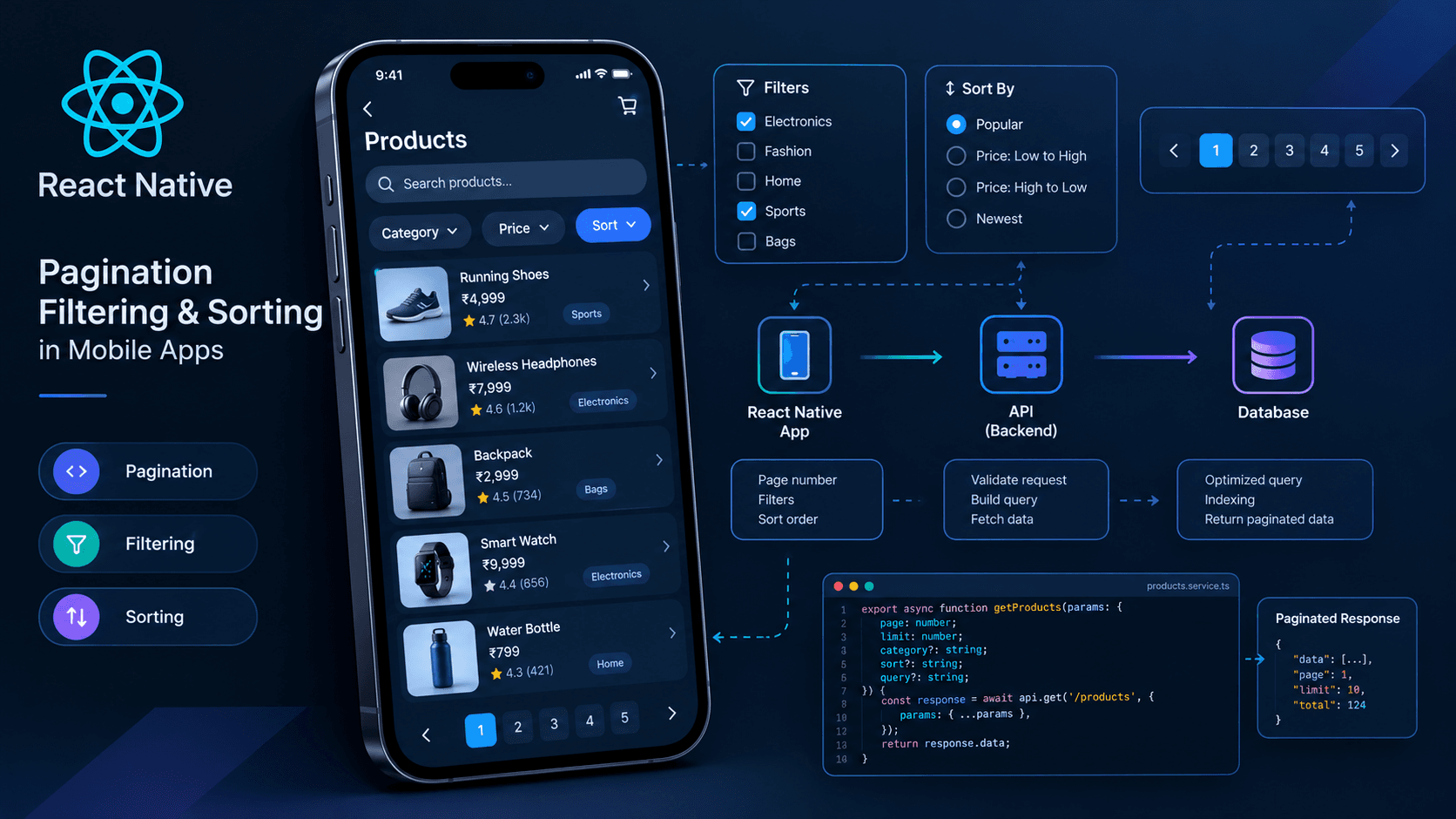
The mobile app sends its current pagination, filter, search, and sorting parameters to the API. The backend validates the parameters, queries the database, and returns the matching records.
Scroll to zoom · Drag to pan
The important detail is that the database returns only the requested subset of matching records, rather than sending the entire dataset to the mobile app.
3. Design the API Contract
Before writing the frontend, decide how the API will accept requests and return results.
A request might look like this:
GET /api/products?page=1&limit=20&category=electronics&sort=price_asc&query=headphonesThe parameters mean:
| Parameter | Purpose | Example |
|---|---|---|
page | Requested page number | 1 |
limit | Maximum records per page | 20 |
category | Optional category filter | electronics |
sort | Sort order | price_asc |
query | Search text | headphones |
A useful response contract is:
{
  "data": [
    {
      "id": "prod_101",
      "name": "Wireless Headphones",
      "price": 2499,
      "category": "electronics"
    }
  ],
  "pagination": {
    "page": 1,
    "limit": 20,
    "total": 87,
    "totalPages": 5
  }
}
The data array contains the current page. The pagination object tells the app how much data matches the request.
This makes it possible to display page controls, determine whether more data exists, and show a result count.
4. Build the Backend Endpoint
Let's implement a simplified Express endpoint using PostgreSQL and Prisma.
Assume your Prisma schema contains a Product model with fields such as id, name, price, category, and createdAt.
The following example uses offset pagination because it is straightforward to explain and works well for page-number interfaces.
Define the accepted query parameters
// src/routes/products.ts

import { Router } from 'express';
import { Prisma } from '@prisma/client';
import { prisma } from '../lib/prisma';

const router = Router();

const allowedSorts = {
  price_asc: { price: 'asc' },
  price_desc: { price: 'desc' },
  newest: { createdAt: 'desc' },
  name_asc: { name: 'asc' },
} satisfies Record<
  string,
  Prisma.ProductOrderByWithRelationInput
>;

type SortOption = keyof typeof allowedSorts;

router.get('/', async (req, res, next) => {
  try {
    const pageValue = Number(req.query.page ?? 1);
    const limitValue = Number(req.query.limit ?? 20);

    if (
      !Number.isInteger(pageValue) ||
      pageValue < 1 ||
      !Number.isInteger(limitValue) ||
      limitValue < 1 ||
      limitValue > 100
    ) {
      return res.status(400).json({
        message: 'Invalid pagination parameters.',
      });
    }

    const page = pageValue;
    const limit = limitValue;

    const category =
      typeof req.query.category === 'string'
        ? req.query.category
        : undefined;

    const query =
      typeof req.query.query === 'string'
        ? req.query.query.trim()
        : undefined;

    const sortValue =
      typeof req.query.sort === 'string'
        ? req.query.sort
        : 'newest';

    if (!(sortValue in allowedSorts)) {
      return res.status(400).json({
        message: 'Invalid sort option.',
      });
    }

    const sort = sortValue as SortOption;

    if (query && query.length > 100) {
      return res.status(400).json({
        message: 'Search query is too long.',
      });
    }

    const where: Prisma.ProductWhereInput = {
      ...(category ? { category } : {}),
      ...(query
        ? {
            name: {
              contains: query,
              mode: 'insensitive',
            },
          }
        : {}),
    };

    const [data, total] = await Promise.all([
      prisma.product.findMany({
        where,
        orderBy: allowedSorts[sort],
        skip: (page - 1) * limit,
        take: limit,
      }),
      prisma.product.count({ where }),
    ]);

    return res.json({
      data,
      pagination: {
        page,
        limit,
        total,
        totalPages: Math.ceil(total / limit),
      },
    });
  } catch (error) {
    next(error);
  }
});

export default router;
What does this endpoint do?
- Validates the page number and page size.
- Rejects unsupported sorting options.
- Builds a database filter from the supplied category and search query.
- Fetches only the requested page.
- Counts the matching records.
- Returns both the records and pagination metadata.
The sort options are selected from an allowlist rather than accepting arbitrary database field names from the client.
This example assumes your project already has Express error-handling middleware, a configured Prisma client, and a compatible Prisma schema. Add authentication and authorization middleware if the product endpoint exposes private data.
Important production considerations
- Add database indexes based on actual query patterns and execution plans.
- Use a minimum page size of 1 and impose a maximum page size.
- Consider the cost of counting every matching row for very large datasets.
- Add a stable tie-breaker to sorting when records can share the same sort value.
- Escape or deliberately handle wildcard characters if you use SQL
LIKEorILIKEsearch. - Consider full-text search or a dedicated search service when substring matching becomes expensive.
For example, sorting by price alone may not produce a stable order when several products have the same price. Adding a unique ID as a secondary sort key can make pagination more predictable.
5. Create a Typed API Client
The React Native app should not construct URLs manually in every component.
Create a shared service that accepts typed parameters and returns a typed response.
// src/features/products/productsApi.ts

import { api } from '../../api/client';

export type Product = {
  id: string;
  name: string;
  price: number;
  category: string;
};

export type ProductSort =
  | 'price_asc'
  | 'price_desc'
  | 'newest'
  | 'name_asc';

export type ProductQuery = {
  page: number;
  limit: number;
  category?: string;
  query?: string;
  sort: ProductSort;
};

export type ProductPage = {
  data: Product[];
  pagination: {
    page: number;
    limit: number;
    total: number;
    totalPages: number;
  };
};

export async function getProducts(
  params: ProductQuery,
  signal?: AbortSignal
): Promise<ProductPage> {
  const response = await api.get<ProductPage>(
    '/api/products',
    {
      params,
      signal,
    }
  );

  return response.data;
}
Axios serializes the query parameters for you.
The generic type helps TypeScript understand the expected response shape. It does not validate data received over the network at runtime. If the API is not fully trusted or the contract may change independently, validate responses using a schema library such as Zod.
6. Build the React Native Product List
For a page-number interface, the app can request a single page and replace the visible data whenever the user changes the page, filters, or sorting order.
Here's the core pattern using React state and FlatList.
// ProductListScreen.tsx

import { useEffect, useState } from 'react';
import {
  ActivityIndicator,
  FlatList,
  Text,
  View,
} from 'react-native';

import {
  getProducts,
  type Product,
  type ProductQuery,
  type ProductSort,
} from './productsApi';

export function ProductListScreen() {
  const [products, setProducts] = useState<Product[]>([]);
  const [page, setPage] = useState(1);
  const [totalPages, setTotalPages] = useState(1);
  const [category, setCategory] = useState<string>();
  const [query, setQuery] = useState('');
  const [sort, setSort] = useState<ProductSort>('newest');

  const [loading, setLoading] = useState(true);
  const [error, setError] = useState<string>();

  useEffect(() => {
    const controller = new AbortController();

    async function loadProducts() {
      setLoading(true);
      setError(undefined);

      const params: ProductQuery = {
        page,
        limit: 20,
        sort,
        ...(category ? { category } : {}),
        ...(query.trim()
          ? { query: query.trim() }
          : {}),
      };

      try {
        const result = await getProducts(
          params,
          controller.signal
        );

        setProducts(result.data);
        setTotalPages(result.pagination.totalPages);
      } catch (err) {
        if (controller.signal.aborted) {
          return;
        }

        setError('Unable to load products. Please try again.');
      } finally {
        if (!controller.signal.aborted) {
          setLoading(false);
        }
      }
    }

    void loadProducts();

    return () => {
      controller.abort();
    };
  }, [page, category, query, sort]);

  function updateCategory(nextCategory?: string) {
    setCategory(nextCategory);
    setPage(1);
  }

  function updateSort(nextSort: ProductSort) {
    setSort(nextSort);
    setPage(1);
  }

  return (
    <View style={{ flex: 1 }}>
      {/* Render search, category filters, and sort controls here. */}

      {loading && products.length === 0 ? (
        <ActivityIndicator />
      ) : error ? (
        <Text>{error}</Text>
      ) : products.length === 0 ? (
        <Text>No products found.</Text>
      ) : (
        <FlatList
          data={products}
          keyExtractor={(item) => item.id}
          renderItem={({ item }) => (
            <View style={{ padding: 16 }}>
              <Text>{item.name}</Text>
              <Text>₹{item.price}</Text>
            </View>
          )}
          refreshing={loading}
          onRefresh={() => {
            setPage((current) => current);
          }}
          ListFooterComponent={
            page < totalPages ? (
              <Text
                onPress={() => setPage((current) => current + 1)}
              >
                Load next page
              </Text>
            ) : null
          }
        />
      )}
    </View>
  );
}
This example illustrates the data-fetching flow, but the UI controls and refresh behavior should be refined before production.
For example, the onRefresh implementation above does not trigger a new request because it sets the page to its existing value. In a real implementation, use a refresh counter, a query library's refetch, or another explicit reload mechanism.
Also, if a request fails after a previous successful load, decide whether to retain the old data and show an inline error or replace the list with a full-screen error. Both patterns can be valid depending on the screen.
7. Reset Pagination When Filters Change
One common bug occurs when a user is on page 5 and selects a category that has only two pages.
If the app keeps requesting page 5, the API may return an empty result even though matching products exist.
Whenever the search query, category, or sorting order changes, reset the page number to 1.
function applyFilters(nextCategory?: string) {
  setCategory(nextCategory);
  setPage(1);
}

function applySort(nextSort: ProductSort) {
  setSort(nextSort);
  setPage(1);
}
There is another subtle detail: React state updates are asynchronous. If multiple state changes happen together, avoid issuing a request using a mixture of old and new filter values.
The effect-based example above handles requests using the current state values after React commits the update.
8. Add Search Without Requesting on Every Keystroke
If you send an API request for every character typed, a user searching for "headphones" could trigger many requests in quick succession.
Debouncing waits for a short pause before updating the search value used by the API.
import { useEffect, useState } from 'react';

function useDebouncedValue<T>(
  value: T,
  delay = 300
) {
  const [debouncedValue, setDebouncedValue] =
    useState(value);

  useEffect(() => {
    const timeoutId = setTimeout(() => {
      setDebouncedValue(value);
    }, delay);

    return () => clearTimeout(timeoutId);
  }, [value, delay]);

  return debouncedValue;
}
Use separate state for what the user types and what the API searches:
const [searchInput, setSearchInput] = useState('');
const debouncedQuery = useDebouncedValue(searchInput, 300);
Bind your search input to searchInput, and use debouncedQuery in your API request effect.
When the debounced query changes, reset pagination to page 1.
Be aware that debouncing does not guarantee that requests finish in order. Cancel outdated requests with AbortController or use a query library that handles request lifecycles.
9. Page-Based Pagination vs. Infinite Scrolling
Both approaches are useful, but they solve different user-experience problems.
Page-based pagination
Best for:
- Admin panels and dashboards.
- Tables with page numbers.
- Screens where users need to jump between pages.
- Interfaces that display total counts.
Infinite scrolling
Best for:
- Social feeds.
- Product discovery screens.
- Activity timelines.
- Long lists where users naturally continue scrolling.
For infinite scrolling, use FlatList.onEndReached and maintain a separate loading-more state. Append new records instead of replacing the existing list.
The backend can still use the same page-based API, although cursor pagination is often a better choice for long feeds that change frequently.
Why cursor pagination can be better
Offset pagination uses a query such as:
SELECT id, name, price
FROM products
ORDER BY created_at DESC, id DESC
LIMIT 20 OFFSET 1000;
The database may need to process or skip many preceding rows as the offset grows.
Cursor pagination instead requests records after a known position.
For a descending order based on created_at and id, a PostgreSQL query can look like:
SELECT id, name, price, created_at
FROM products
WHERE
  (created_at, id) < ($1, $2)
ORDER BY created_at DESC, id DESC
LIMIT 20;
Here, $1 and $2 represent the timestamp and ID of the last item from the previous page. In a real implementation, the server should encode and validate the cursor and handle the first-page case separately.
An index aligned with the filtering and ordering pattern can improve performance.
Cursor pagination is not automatically faster in every situation, but it is often a good fit for large, continuously changing feeds.
10. Keep Filtering and Sorting Consistent
For large datasets, apply filters and sorting on the server rather than fetching every record and processing the complete collection in JavaScript.
A database query might look like this:
SELECT id, name, price, category
FROM products
WHERE category = $1
ORDER BY price ASC, id ASC
LIMIT $2 OFFSET $3;
The parameters should be supplied through your database driver's parameterized query mechanism.
Do not interpolate untrusted search values into SQL strings. For dynamic sort columns, use an explicit allowlist because database parameters generally cannot represent identifiers such as column names.
For example, an index on (category, price, id) may help a query that filters by category and sorts by price and ID. Whether it actually helps depends on the query plan, selectivity, table size, and workload.
Use EXPLAIN ANALYZE with representative queries to verify your assumptions.
11. Handle Loading, Empty, and Error States
A production list needs more than a successful API response.
Initial loading: Display a spinner or skeleton while the first request is running.
Loading more: Show a footer indicator without hiding existing content.
Empty results: Explain that no products match the selected filters and provide a way to clear them.
Network failure: Keep the interface understandable and provide a retry action.
Refresh: Let users explicitly reload the current results.
Stale responses: Prevent an older request from overwriting the results of a newer filter or search request.
These states are important because mobile users may switch networks, background the app, or interact with controls while requests are still running.
For complex screens, a query library such as TanStack Query can manage caching, request status, cancellation, and pagination. Its infinite-query APIs are particularly useful for feed-style interfaces.
Reference: TanStack Query — Infinite Queries
12. Common Mistakes to Avoid
- Fetching an entire large dataset and paginating it only on the client.
- Forgetting to reset the page when filters change.
- Accepting unlimited page sizes from API clients.
- Building SQL queries by concatenating untrusted input.
- Allowing arbitrary sort fields from the request.
- Using unstable sorting when records have identical sort values.
- Ignoring request races during search.
- Showing an empty state while a request is still loading.
- Assuming TypeScript types validate network responses at runtime.
- Using offset pagination for every use case without considering cursor pagination.
- Running expensive count queries without measuring their impact.
- Forgetting indexes that support important filtering and sorting patterns.
Conclusion
Pagination, filtering, and sorting are essential building blocks for scalable mobile applications.
The mobile app should request the data it needs, the API should validate and interpret the request, and the database should retrieve the matching records efficiently.
Start with a clear API contract, use typed request parameters, reset pagination when filters change, and handle loading and error states deliberately. For very large or frequently changing feeds, evaluate cursor pagination.
The goal is not simply to display fewer records. It is to make the app responsive while keeping the data flow predictable and the backend efficient.