Redis Caching: Making Backend APIs More Efficient
Redis Caching: Making Backend APIs More Efficient
Every time a client requests data from an API, the server may need to query a database, process the result, and send a response. When the same data is requested repeatedly, this can create unnecessary database work.
Caching helps solve this problem by temporarily storing frequently accessed data so it can be returned more quickly.
One popular tool for this is Redis.
In this article, we will explore how Redis caching works, how to integrate it into a Node.js API, and how to avoid common mistakes when using caching in production.
1. What Is Caching?
Caching is the process of storing a copy of data in a location where it can be accessed more quickly.
Imagine you are building an e-commerce application. Every time a user opens the product listing page, your backend queries the database to retrieve the same product information.
If hundreds of users request that information repeatedly, the database may perform similar work many times.
Instead, you can temporarily store the result in a cache.
The next request can retrieve the cached data without repeating the database query, provided the cached entry is still valid.
Without caching
Client
  |
  v
Node.js API
  |
  v
Database
  |
  v
Response
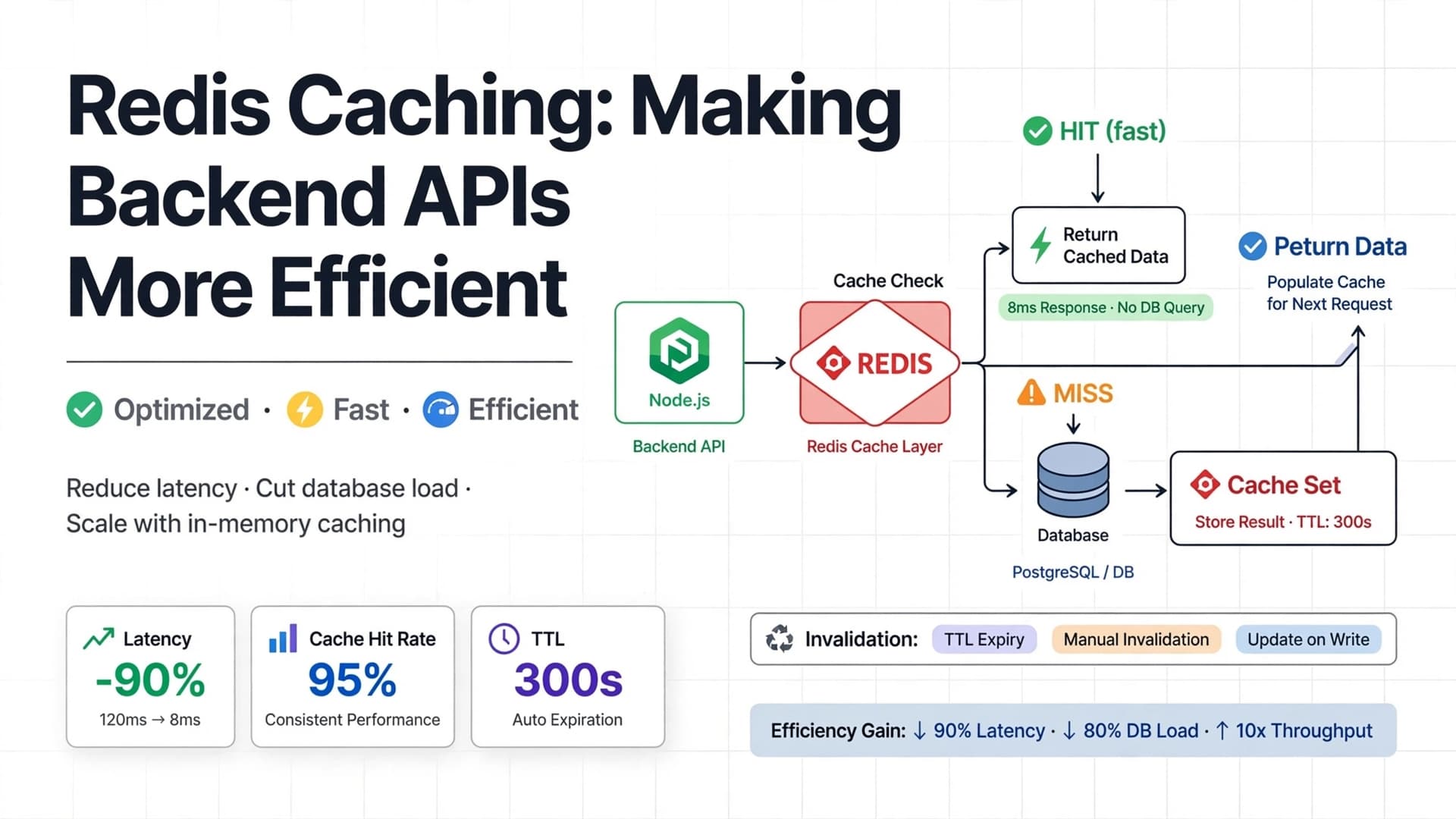
With caching
Client
  |
  v
Node.js API
  |
  v
Redis Cache
  |
  +---- Cache Hit ------> Return Cached Data
  |
  +---- Cache Miss -----> Database
                              |
                              v
                         Store in Redis
                              |
                              v
                         Return Data
Caching can reduce repeated database queries and improve response times, especially when data is frequently requested.
However, caching does not automatically make every application faster. The benefit depends on access patterns, data size, network latency, and cache configuration.
2. What Is Redis?
Redis is an in-memory data store that supports data structures such as strings, hashes, lists, sets, and sorted sets.
It is commonly used for:
- API response caching.
- Session storage.
- Rate limiting.
- Temporary application data.
- Queues and messaging patterns.
- Leaderboards and counters.
Redis is often used as a cache because it can serve data from memory instead of requiring a database to perform the same work repeatedly.
For example, an application might use:
- PostgreSQL to store permanent product records.
- Redis to temporarily store frequently requested product listings.
- Node.js and Express to handle API requests.
The database remains the source of truth. Redis holds a temporary copy that can be recreated when necessary.
3. How Do Cache Hits and Cache Misses Work?
Two terms are essential to understanding caching.
Cache hit: The requested data already exists in the cache and can be used.
Cache miss: The requested data is not available in the cache, so the application must retrieve it from another source, such as a database.
Consider a request for /api/products.
On the first request:
- The API checks Redis.
- Redis does not contain the product listing.
- The API retrieves the products from the database.
- The API stores the result in Redis.
- The API returns the products to the client.
This is a cache miss.
On the next request:
- The API checks Redis.
- Redis contains the cached product listing.
- The API returns the cached data.
This is a cache hit.
The database query is avoided on the second request.
A higher cache hit rate can reduce database load, but correctness, latency, memory usage, and data freshness also matter.
4. Understanding the Cache-Aside Pattern
One of the most common caching strategies is called cache-aside, also known as lazy loading.
In this pattern, the application manages the cache explicitly.
The process is simple:
- Check whether the requested data exists in the cache.
- If it exists, return the cached value.
- If it does not exist, fetch the data from the database.
- Store the result in the cache with an expiration time.
- Return the result to the client.
The application loads data into Redis only when it needs it.
This avoids caching every database record, including records that may never be requested.
Cache-aside is a practical starting point for many Node.js APIs because it is straightforward to implement and gives the application control over caching behavior.
5. Set Up Redis in a Node.js Project
For this example, we will use Node.js, Express, and the official Redis JavaScript client.
Install the required packages:
npm install express redisMake sure a Redis server or Redis-compatible managed service is available. Installing the JavaScript client alone does not start a Redis server.
For local development, you can run Redis using Docker:
docker run --name redis-cache -p 6379:6379 -d redis:7This command starts a Redis container and exposes its default port on the host.
For local development, the default connection URL is usually:
redis://localhost:6379Do not expose Redis publicly or use this basic configuration as a production security setup. Production deployments should use suitable network restrictions, authentication, and TLS where supported.
6. Connect Node.js to Redis
Create a Redis client in a dedicated module.
// src/config/redis.js

import { createClient } from "redis";

export const redis = createClient({
  url: process.env.REDIS_URL || "redis://localhost:6379",
});

redis.on("error", (error) => {
  console.error("Redis client error:", error);
});

export async function connectRedis() {
  if (!redis.isOpen) {
    await redis.connect();
  }
}
This module creates one client that can be reused throughout the application.
Do not create a new Redis connection inside every request handler. Reusing a client avoids unnecessary connection overhead.
A local .env file might contain:
REDIS_URL=redis://localhost:6379
PORT=3000
Load environment variables using your preferred configuration approach. Supported Node.js versions can also load environment files through the --env-file option.
Start the Redis connection before accepting requests:
// src/server.js

import app from "./app.js";
import { connectRedis } from "./config/redis.js";

const port = process.env.PORT || 3000;

async function startServer() {
  await connectRedis();

  app.listen(port, () => {
    console.log(`API running on port ${port}`);
  });
}

startServer().catch((error) => {
  console.error("Failed to start the application:", error);
  process.exit(1);
});
This example uses a fail-fast startup policy: the API does not start if Redis cannot connect.
That policy is appropriate only if Redis is a required dependency for startup. If caching is optional, a different startup and fallback strategy may be more suitable.
7. Create a Basic Cache-Aside Helper
Before caching an API response, create a reusable function that handles the common cache lookup flow.
// src/utils/cache.js

import { redis } from "../config/redis.js";

export async function getOrSetCache(
  key,
  ttlSeconds,
  fetchData
) {
  const cachedValue = await redis.get(key);

  if (cachedValue !== null) {
    return JSON.parse(cachedValue);
  }

  const freshValue = await fetchData();

  if (freshValue !== null && freshValue !== undefined) {
    await redis.set(
      key,
      JSON.stringify(freshValue),
      { EX: ttlSeconds }
    );
  }

  return freshValue;
}
This helper performs three main tasks:
- Checks Redis for an existing value.
- Calls the supplied function when the cache misses.
- Stores the result with a time-to-live (TTL).
The fetchData function represents the operation that retrieves the data, such as a database query.
This basic helper assumes that cached values can safely be serialized as JSON. It also assumes Redis is available. Error handling and cache-failure behavior must be considered before using it in production.
8. Add Caching to an Express Endpoint
Suppose your application has a product listing endpoint.
The following example assumes that you already have a database function named getProductsFromDatabase(). Replace it with the actual query used by your application.
// src/routes/product.routes.js

import { Router } from "express";
import { getOrSetCache } from "../utils/cache.js";
import {
  getProductsFromDatabase,
} from "../services/product.service.js";

const router = Router();

router.get("/", async (req, res) => {
  const products = await getOrSetCache(
    "products:all:v1",
    60,
    () => getProductsFromDatabase()
  );

  res.status(200).json({
    success: true,
    data: products,
  });
});

export default router;
The key products:all:v1 identifies the cached product listing.
The value 60 sets the cache expiration to 60 seconds.
During that period, requests can reuse the cached result instead of querying the database each time.
After the entry expires, the next request will fetch fresh data and populate the cache again.
This route uses Express 5's automatic forwarding of rejected async-handler promises to error middleware. If you use Express 4, add appropriate async error handling.
9. What Is TTL?
TTL stands for Time To Live.
It defines how long a cached entry remains valid before Redis automatically expires it.
For example:
await redis.set(
  "products:all:v1",
  JSON.stringify(products),
  { EX: 60 }
);
The EX: 60 option sets the expiration to 60 seconds.
You can choose different TTL values depending on how frequently the data changes and how fresh it needs to be.
| Type of data | Example TTL |
|---|---|
| Frequently changing product inventory | A few seconds, or explicit invalidation |
| Product descriptions | Several minutes |
| Public category lists | Several minutes |
| Frequently changing dashboard statistics | A few seconds |
| Reference data that changes rarely | Longer, with appropriate invalidation |
These are illustrative starting points, not universal rules.
A longer TTL may improve cache reuse but allow stale data to remain available for longer. A shorter TTL improves freshness but can increase database traffic.
Choose TTL values based on actual application requirements.
10. Cache Invalidation: The Difficult Part
Caching introduces a new problem: the cache can become outdated.
Imagine a product is priced at ₹999. The API caches that product, but an administrator changes its price to ₹1,099 in the database.
If the cached value is still being used, the API may return the old price.
This is why cache invalidation matters.
One common approach is to delete the cached entry after a successful database update.
import { redis } from "../config/redis.js";

export async function updateProduct(id, updateData) {
  const updatedProduct = await updateProductInDatabase(
    id,
    updateData
  );

  await redis.del(`product:${id}`);
  await redis.del("products:all:v1");

  return updatedProduct;
}
Here, updateProductInDatabase() represents your application's actual database operation.
This example assumes that the application caches both individual products and the complete product listing under the shown keys.
Deleting the entries forces later requests to fetch fresh data.
However, if the database update succeeds but Redis deletion fails, stale data may remain until its TTL expires. Applications that require stronger consistency may need retries, event-driven invalidation, or a reliable mechanism such as a transactional outbox.
Important: Update the database first, then invalidate the affected cache entries. Never treat a cache deletion as proof that a database update succeeded.
11. Design Cache Keys Carefully
Cache keys identify the values stored in Redis.
Poorly designed keys can cause incorrect responses, unnecessary misses, or accidental mixing of data between users.
For example:
products:all:v1
product:42
products:category:electronics
products:category:electronics:page:2
A useful key generally describes:
- The type of resource.
- The relevant identifier or query parameters.
- A version or namespace when appropriate.
For a filtered product listing, the cache key must account for every parameter that changes the result.
For example:
products:category:electronics:page:2:limit:20If the response also depends on sorting, locale, currency, permissions, or other request-specific values, those may need to be included too.
Never use the same cache key for different representations of data.
For user-specific responses, include an appropriate user or tenant identifier and authorization context, or avoid caching the response altogether. A cache-key mistake can become a data-isolation or security problem.
12. What Should You Cache?
Not every piece of data belongs in a cache.
Good candidates often include:
- Public product listings.
- Product details that are read frequently.
- Category and configuration data.
- Expensive aggregations.
- Results of costly computations.
- Data that is requested repeatedly and can tolerate a defined freshness window.
Be careful when caching:
- Bank balances or payment status.
- Inventory that must be accurate at the moment of purchase.
- Frequently changing authorization information.
- Private user data.
- Large responses with low reuse.
- Data that changes on almost every request.
The decision depends on the application's consistency requirements.
For example, caching a product description for a minute may be acceptable. Using a stale inventory value to confirm a purchase could be unsafe.
Caching should improve performance without weakening important business rules.
13. Handle Redis Failures
Redis is another dependency, and dependencies can fail.
Possible problems include:
- A Redis server restart.
- A network interruption.
- Authentication or configuration errors.
- Memory pressure.
- Connection timeouts.
If caching is optional, the application may be able to continue serving requests directly from the database when Redis is unavailable.
Conceptually, the flow becomes:
Request
  |
  v
Try Redis
  |
  +---- Cache Hit ------> Return Cached Data
  |
  +---- Cache Miss -----> Query Database
  |
  +---- Redis Failure --> Query Database
The fallback path must be designed carefully. If Redis fails while many requests arrive, all of them may hit the database at once.
A production implementation should consider:
- Bounded connection and command timeouts.
- Safe logging and monitoring.
- A fallback policy appropriate to the endpoint.
- Retry limits and backoff.
- Protection against overwhelming the database.
Do not blindly retry Redis operations forever. Repeated retries can increase latency and make an outage worse.
Also distinguish a cache miss from a Redis error. A miss means the key is absent; an error means the cache could not be read successfully.
14. Avoid the Cache Stampede Problem
A cache stampede occurs when a popular cache entry expires and many requests try to rebuild it simultaneously.
Suppose a popular endpoint receives hundreds of requests per second. Its cached value expires, and many requests all query the database before any request repopulates Redis.
Instead of reducing database work, the cache temporarily creates a surge of queries.
Possible ways to reduce this risk include:
- Using a short-lived lock so only one request rebuilds the entry.
- Refreshing popular entries before they expire.
- Adding small amounts of random variation to TTL values.
- Serving a previously cached value briefly while refreshing it, when stale responses are acceptable.
- Applying request coalescing so concurrent requests share one database operation.
Not every application needs these techniques immediately. Start by measuring request volume and database load, then add protection for expensive, highly popular cache entries.
15. Monitor Cache Performance
Adding Redis does not guarantee that an API has become faster.
Measure the result.
Useful metrics include:
- Cache hit rate: How often requested entries are found.
- Cache miss rate: How often the application needs another data source.
- API latency: How long requests take, including median and tail latency.
- Database query volume: Whether caching actually reduces repeated work.
- Redis latency: How long cache operations take.
- Memory usage: Whether cached data is consuming too much memory.
- Evictions and errors: Whether Redis is removing entries or failing requests unexpectedly.
For example, a cache with a low hit rate may be storing data that is rarely requested. A high hit rate can still be problematic if cached values are too large or too stale.
Use metrics to decide whether a caching strategy is helping rather than assuming it must be beneficial.
16. A Practical Redis Caching Checklist
Before deploying caching to production, review these points:
- Redis is configured securely.
- A shared client is reused instead of opening connections per request.
- Cached values have sensible TTLs.
- Cache keys include relevant query and authorization context.
- Database writes invalidate or update affected cache entries.
- Redis failures have a deliberate fallback policy.
- Cache stampedes are considered for expensive, popular entries.
- Sensitive data is not exposed through shared cache keys.
- Hit rate, latency, errors, and memory usage are monitored.
- Tests cover cache hits, misses, expiration, and invalidation.
Conclusion
Redis caching can make backend APIs more efficient by avoiding repeated database work and serving frequently requested data from memory.
The cache-aside pattern is a practical place to begin: check Redis, fetch from the database on a miss, and store the result with an appropriate TTL.
But effective caching requires more than adding a Redis client. You must also consider data freshness, invalidation, key design, failure handling, security, and monitoring.
Start with a high-traffic endpoint where repeated work is measurable. Add caching, measure the improvement, and expand only when the results justify it.
Remember: Redis should make your application faster, not become a second source of truth that makes your data harder to trust.